Songlyph
Upload any song and watch it draw itself. Every beat, chord and change in loudness leaves a mark, so each song gets a picture no other song can make.
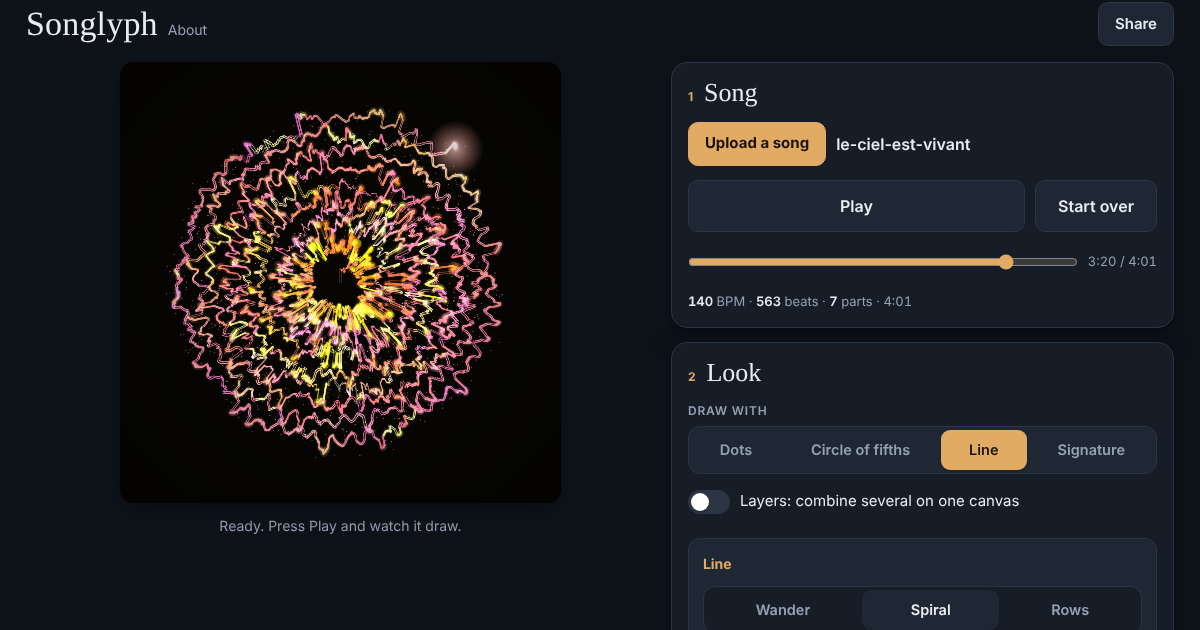
Tap the picture to try itOpen the app →
How it works
- Upload a song (MP3 or any audio file your browser can play).
- The app listens to the whole song first: tempo, beats, chords, loudness, bass and treble, stereo width, and where the song changes parts.
- Pick how it draws: Dots, Circle of fifths, Line or Signature. Turn on Layers to stack several on the same canvas.
- Press Play and watch the drawing grow with the music, or jump anywhere with the slider.
- Save the finished picture, or a full video with the song's sound.
Why it's unique
The drawing is a fingerprint of the song itself. Each measurable trait leaves its own visible trace:
- Beats
- drop the large shapes and kink the line
- Chords
- pick the colour and the direction
- Loudness
- sets the size and brightness
- Bass and treble
- set the height and the thickness
- Stereo width
- splits the line in two
- New parts
- leave rings and bursts
The same song always gives the same drawing, and a different song can't give the same one.
What you get
- Picture (PNG) at full resolution: 1440 × 1440 (1:1), 1080 × 1920 (9:16) or 1920 × 1080 (16:9).
- Video (MP4) with the song's sound, H.264 + AAC, 30 or 60 fps, drawn frame by frame so it plays smoothly. 9:16 is for TikTok, Reels and Shorts, 1:1 for Instagram posts, 16:9 for YouTube.
- Video export works in Chrome and Edge on a computer. On phones it depends on the browser, and the app tells you if yours can't do it.
Your privacy
Your song never leaves your device. All listening and drawing happens in your browser; nothing is uploaded or stored.